


Universal Orlando Resort
3.02.23K Reviews
App Specs
- Version
- 2026.5.1
- Updated On
- License
- Free
- Downloads
- 5,000,000+
- Developer
- NBCUniversal Media, LLC
- Categories
- Travel & Local
- Platform
- Android, iOS
Screenshots

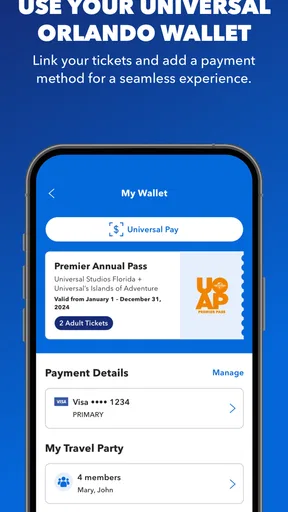
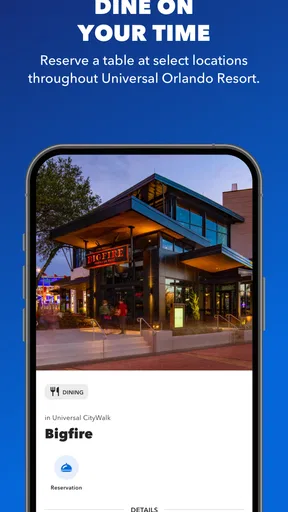
 Analysis by AppCompare
I find a park app most useful when more than one person needs the same plan but nobody wants to spend the whole day passing a phone around. For a household heading to Universal Orlando, this app can serve as a shared reference for maps, showtimes, dining, and admission, while each person still uses their own judgment about what to do next. It is a practical companion rather than a substitute for talking through the day together.
One plan, several people
A realistic use is a group arriving with different priorities: one person wants to check a ride wait, another is looking for food, and someone else wants to know when a show starts. Instead of relying on one person to remember every detail, I’d use the app as a common point of reference and agree on a nearby meeting place before splitting up. That makes the location-sharing option more useful as a coordination aid, not as a replacement for a clear plan.
There is a trade-off, though. A phone with the app may become the household’s unofficial control center, which can be awkward if its owner is in a queue or needs to charge it. I’d make sure the group knows the next planned stop and a fallback meeting point, rather than assuming everyone can check the same screen at any moment. If several people need to consult park information independently, having the app available on more than one device may be more convenient than relying on a single handset.
Set up access with care
Digital tickets are handy at entry, but I would treat access to them as something to organize before reaching the gate. The person responsible for the booking should check that the necessary tickets or passes are accessible on the device they plan to use, and the group should know who is holding that device. This simple division of responsibility can prevent a last-minute scramble when everyone is ready to enter.
Shared-device use also calls for a little thought. If a parent lets a child browse the map or look at showtimes, that is different from handing over a phone that contains admission details or account access. I’d keep those tasks separate where possible: let a younger visitor help choose the next stop, while an adult manages ticket access and any purchases. That is ordinary household caution, not a claim that the app provides special family controls.
Coordination without overplanning
The app’s maps, wait information, and schedule can make it tempting to build a minute-by-minute itinerary. I prefer using them to make a few decisions at a time. Check what is nearby, compare the options with the group’s energy and interests, then choose a next step. A plan with room to change is more useful than one that falls apart as soon as a wait or meal takes longer than expected.
For a family with mixed ages, I’d also use showtimes and dining information as anchors rather than trying to keep everybody moving at the same pace. A scheduled show can give the group a natural time to reunite, while a meal can be a chance to adjust the rest of the day. The app is at its best when it reduces small logistical questions; it cannot decide what each person will enjoy or settle disagreements about priorities.
Worth Reading Before You Choose

EA SPORTS FC Mobile 26 Is a Bigger Football Game, but It Takes Time

Flipboard Shows What News Apps Must Do Beyond the Feed

Switching to Android Auto Means Rethinking Your Driving Routine

Google Calendar Makes a Crowded Week Easier to Manage

Ludo King Makes the Most of the Minutes Between Plans

Baby Panda World Brings Quick Play to Modern Phones, but Its Game Library Feels Busy
Age, trust, and expectations
The app is rated Everyone 10+, and I see it as a planning tool that can be useful to older children with an adult’s guidance. Younger kids may enjoy helping with the map, but I would not make them responsible for tickets, purchases, or keeping the group together. The rating is a useful age-context clue, while the adult still needs to decide what is appropriate for the particular child and how much device access makes sense.
My trust in the app is practical rather than absolute: I’d consult its information while remaining ready to adapt if the day changes. A theme-park visit involves crowds, changing plans, and competing preferences, so it is sensible to confirm the next step with the people you are travelling with instead of treating a notification or itinerary as an instruction. If the phone battery is low or a visitor prefers not to use an app, a simple verbal plan and a fixed meeting point remain worthwhile backups.
Who will get the most from it?
I’d recommend the app most to visitors who expect to move between the parks, check attraction waits, look up food, or keep a group coordinated. It is less compelling for someone who wants to avoid phone use during a visit, already has a simple plan, or would rather rely on signs and ask staff for directions. Compared with a general travel map, its appeal is that it is focused on the Universal Orlando visit; a general map is more useful for getting around the wider area, while this app is the more relevant tool for park-specific decisions.
Universal Orlando Resort is a free Travel & Local app from NBCUniversal Media, LLC. It has an average rating of 3.0 from around nine thousand ratings, and more than five million installs. That combination suggests a widely used tool with a mixed reception, so I would judge it by whether its park-specific planning features suit your visit rather than assuming popularity means it will work perfectly for everyone. It is rated Everyone 10+, first released in June 2014, and its current version is 2026.5.1 for devices running Android 9 or later.
For a household, my advice is to decide in advance who handles tickets, who can use the phone, and where everyone will meet if plans change. The app can make those arrangements easier to carry out, but it does not remove the need for them. If you want a flexible park companion and are comfortable checking a phone during the day, I’d install it before travelling and explore the parts you expect to use. If you prefer a low-tech visit, you can skip it without giving up the basic ability to plan together.
Ever found yourself daydreaming about the perfect vacation spot that combines thrilling rides, magical experiences, and a sprinkle of cinematic wonder? Well, let me introduce you to the Universal Orlando Resort app. This nifty tool is like having a personal guide right in your pocket, making your visit to one of the world’s most famous theme parks an absolute breeze.
Your Handy Theme Park Companion
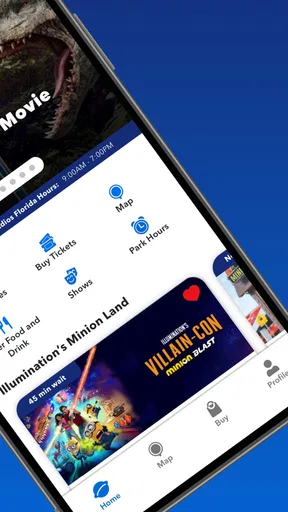
Let’s dive right in! The Universal Orlando Resort app is designed to enhance your park experience in a way that’s both convenient and fun. Whether you’re planning your day or spontaneously deciding your next move, this app has got your back.
Easy Navigation and Planning
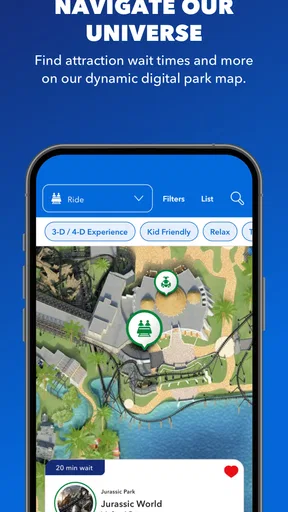
First off, the app’s interface is super user-friendly. You don’t need to be a tech wizard to figure it out. With interactive maps, you can easily navigate through Universal Studios Florida, Islands of Adventure, and Volcano Bay. The map is responsive and lets you zoom in and out to find attractions, restaurants, and amenities. It’s like having a virtual map that knows exactly where you are!
What I love is the app’s ability to help with planning. You can check real-time wait times for rides, which means less standing in line and more enjoying your day. You can also set alerts for wait times. It’s like having a theme park insider giving you the scoop!
Showtimes and Events
Now, if you’re like me and don’t want to miss a single show or parade, the app has got you covered. The showtimes feature is pretty handy. It lists all the live shows, parades, and special events happening throughout the park. You can create a personal itinerary to ensure you hit all the must-sees. It’s perfect for families or groups who want to make the most of their time.
For me, the strongest way to use those schedules is to check them before making a cross-park detour. If a performance is a priority, I’d work the surrounding rides and meal stop around its listed time, then leave some slack for walking and regrouping. That approach is more forgiving than trying to chase every event on the schedule, and it gives the group a clear reason to move in one direction together.
Dining and Reservations
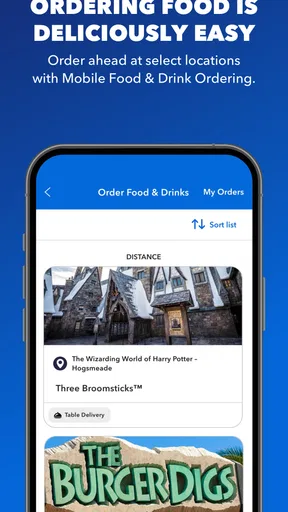
Feeling hungry? The app helps you find dining options that suit your taste buds. Whether you’re craving a quick snack or a sit-down meal, you can browse through menus and even make reservations at select restaurants. The best part? You can use the mobile ordering feature to skip the lines at some locations. That’s a win in my book!
Mobile ordering is most helpful when the group has already agreed on what to eat and is close enough to act on that choice. I would browse menus during a quieter moment, narrow down options that suit everyone, and use ordering as a way to reduce time spent queuing rather than as a guarantee of an instant meal. For a mixed group, checking choices before hunger peaks can prevent the person holding the phone from having to negotiate everyone’s preferences at the last minute.
Tickets and Passes
Gone are the days of fumbling with paper tickets. With the app, your tickets and passes are stored digitally. You can easily access them for entry into the parks. It’s also easy to purchase additional tickets directly through the app, which is super convenient if you’re planning a spontaneous visit.
I would still prepare for the practical moment of getting to the entrance: open the relevant ticket screen before the group reaches the front, and keep the device with the person who is managing admission. That small bit of preparation matters more when one phone is serving several people. It also helps to avoid mixing ticket management with casual browsing, especially if a child is using the same device to look at maps or choose an attraction.
Insider Tips and Notifications
Another cool aspect is the insider tips section. The app provides useful advice and suggestions based on your location in the park. Plus, with notifications, you’ll receive updates on park happenings, special offers, and more. It’s like having a park guide whispering insider secrets to you!
I’d treat notifications as prompts to check, not instructions to follow immediately. A new alert can be useful when it relates to something the group cares about, but constantly reacting to every update can make a day feel more hectic than it needs to be. If you are trying to preserve battery or limit distractions, it makes sense to open the app deliberately when you need a map, a wait estimate, or a schedule check instead of letting the phone dictate the pace.
And let’s not forget about the fun trivia and facts sprinkled throughout the app, adding a little extra magic to your visit.
Staying Connected
For those of us who love to share our adventures, the app makes it easy to connect with family and friends. You can share your location and see where your friends are in the park. It’s a great way to keep the group together or meet up for a ride.
Location sharing is most valuable when the group has a reason to separate briefly and a clear plan for reconnecting. I would agree on a landmark or another easy-to-describe meeting point as well, so nobody has to depend entirely on a phone to find the others. If your group prefers to stay together, the map and schedule can still help everyone make decisions without using location sharing at all.
In conclusion, the Universal Orlando Resort app is a must-have for anyone visiting the park. It takes the stress out of planning and navigation, allowing you to focus on having fun. Whether you’re a first-timer or a seasoned visitor, this app enhances your experience in ways you didn’t even know you needed. So, next time you’re gearing up for an epic adventure at Universal Orlando, don’t forget to download the app. Trust me, you’ll thank me later!
Pros
- User-friendly interface for easy navigation.
- Comprehensive maps with ride wait times.
- Personalized itineraries enhance experience.
- Integrated ticket and pass management.
- Special deals and notifications for users.
Cons
- Requires constant internet connection.
- High battery consumption during use.
- Limited features without login.
- Occasional lag on older devices.
- Large app size takes up storage.
FAQs for Universal Orlando Resort
What features does the Universal Orlando Resort app offer?
The Universal Orlando Resort app provides a comprehensive guide to the theme park, including interactive maps, real-time wait times for rides, and show schedules. It also allows users to purchase tickets, reserve dining, and receive alerts for special offers and events. The app is designed to enhance your park experience by offering convenient access to all the information you need.
Is the Universal Orlando Resort app free to download and use?
Yes, the Universal Orlando Resort app is free to download on both Android and iOS platforms. While the app itself does not require any payment, some features, such as purchasing tickets or dining reservations, will involve additional costs. The app is a valuable tool for planning your visit efficiently without any download fee.
Can I use the Universal Orlando Resort app offline?
While the app can be downloaded and some features may be accessible offline, such as maps, most functionalities, including real-time updates on ride wait times and show schedules, require an internet connection. To fully benefit from the app's capabilities, it is recommended to have a stable internet connection during your visit.
Does the app support multiple languages?
The Universal Orlando Resort app primarily supports English, but it may offer limited support for other languages, including Spanish and Portuguese. Users should check the app settings to see the available language options. Language support can enhance the experience for international visitors by providing essential information in their native language.
How does the Universal Orlando Resort app handle user privacy and data security?
The app is committed to protecting user privacy and employs industry-standard security measures to safeguard personal information. It collects data necessary for app functionality, such as location for maps and notifications. Users should review the privacy policy to understand what information is collected and how it is used, ensuring they are comfortable with the app's data practices.


